3D Plan
Stand in your reception before it’s built.
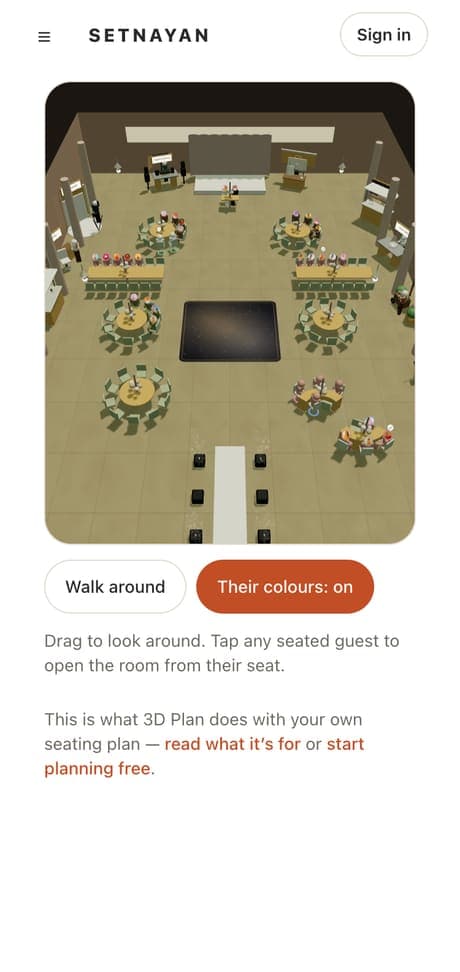
Setnayan 3D Plan turns the seating plan you already made into a 3D room you can walk through in your browser. It is free, and it helps you spot a blocked view or a tight aisle while it is still a plan.
Price Free
Who it’s for
Hosts, coordinators and stylists who want everyone to picture the same room before it exists.
How it works
- 01
Lay out your tables in the free seat plan.
- 02
Open the 3D view and your flat plan stands up into a room you can walk. Changes to the plan flow straight in.
- 03
Fix the tight aisle or blocked view while there is still time, and show others the exact room.
What makes it different
- It builds on your seat plan, so there is no room to rebuild from scratch.
- It runs in the browser with nothing to install.
- The wedding party wears the colours you set for their role on your Mood Board.
Works with the rest of Setnayan
Questions
Do I build the 3D room from scratch?
No. It builds on the seat plan you already make. Open the 3D view and your plan stands up into a room.
Is 3D Plan free?
Yes. The seat plan and 3D Plan are both free.
What can I catch with it?
What a flat chart hides: a view blocked by a pillar, a path too tight for a gown, a head table that looks smaller than you pictured.
Does it need a special device?
No. It runs in the browser on the phone or laptop you already use.