Wedding March
Arrange who walks, with whom, in what order.
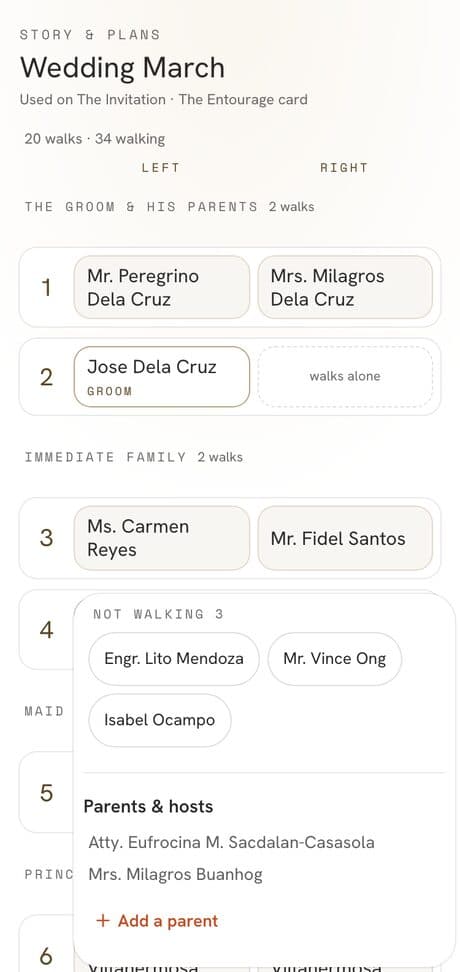
Setnayan Wedding March is where you set the processional: who walks, beside whom, and in what order. You drag names from your guest list into two columns, walk by walk, and the same order becomes the entourage your guests see and the card you print.
Price Free
Who it’s for
Couples and coordinators lining up parents, sponsors, bearers and the wedding party, who want one order everyone reads.
How it works
- 01
Open Wedding March. Your entourage is already there from your guest list, grouped into sections such as the groom and his parents.
- 02
Drag names between the left and right columns and from walk to walk. Someone can walk alone, or wait in Not walking.
- 03
Preview, then Apply. Guests see the entourage on your Event Hub, and The Entourage card is ready to print.
What makes it different
- It reads your guest list and roles, so nobody is typed twice.
- Moves stay a draft until you Apply, and Undo takes back a wrong drag.
- Tap any name to open that person’s guest card.
- One order feeds the Event Hub’s entourage and the printed card.
Works with the rest of Setnayan
Questions
Do I type the entourage again?
No. It comes from the roles on your guest list. You only arrange who walks with whom.
Can someone walk alone?
Yes. Leave the other side empty and they walk alone, or move them to Not walking.
Can I print it?
Yes. The Entourage card is part of your invitation set.